
本ページのSQLを利用する前に、利用前の確認事項を必ずご確認ください。自社のプロジェクトIDとプロパティIDをfrom句に設定してからクエリを実行してください。
このページでは、BigQueryの応用的なクエリと運用に役立つクエリを紹介します。イベント・パラメータの一覧取得、直帰率・エンゲージメント時間の算出、デフォルトチャネルグループ分類、URL階層分析、intradayテーブル活用、データ品質チェック、collected_traffic_sourceの利用、クエリパフォーマンス最適化のTipsなど、実務運用で活躍するSQL集です。
目次
37:取得イベント名とパラメータ名の一覧表示
SELECT
    event_name, --イベント名を取得
    params.key as event_parameter_key, --イベントパラメータ名を取得
    case
      when params.value.string_value is not null then 'string' --文字列
      when params.value.int_value is not null then 'int' --整数
      when params.value.double_value is not null then 'double' --64ビット倍精度小数点
      when params.value.float_value is not null then 'float' --32ビット倍精度小数点
end
     as event_parameter_value --イベントパラメータ値を分類

from
    `ha-ga4.analytics_227084301.events_*`,    -- データの選択範囲。ここでは全期間とし、whereの部分で日付を指定する
    unnest(event_params) as params
where
    _table_suffix between '20220201' and '20220205'  -- 日付の指定

group by
    event_name,
    event_parameter_key,
    event_parameter_value

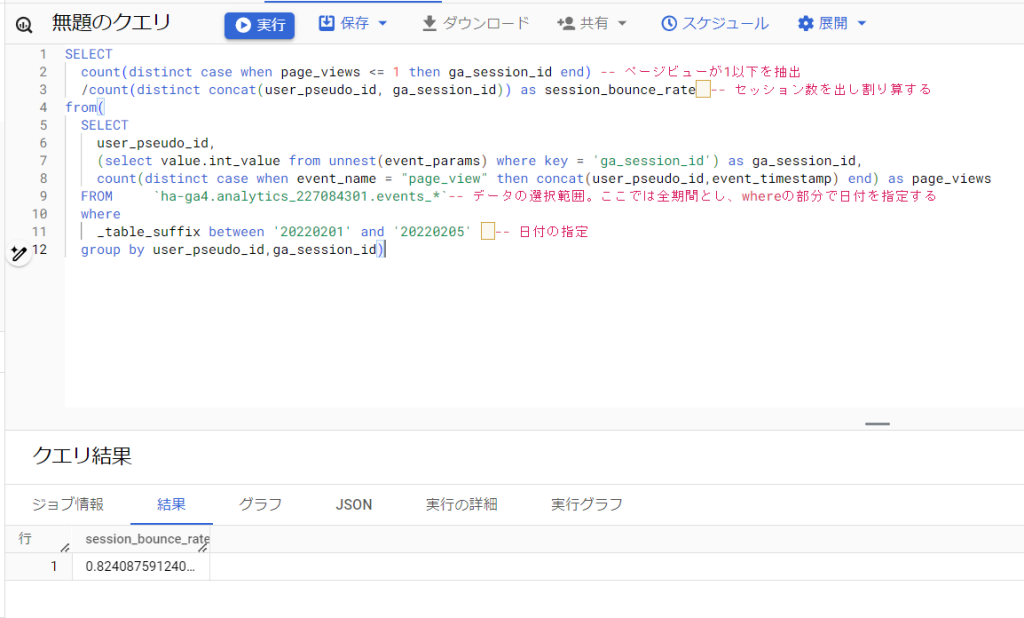
38:1ページだけ閲覧したセッション数や率
直帰「数」を出したい場合は、セッション数との割り算を行わない
SELECT
  count(distinct case when page_views <= 1 then ga_session_id end) -- ページビューが1以下を抽出(ページビューが発生しなかったセッションも抽出するため1以下を指定)
  /count(distinct concat(user_pseudo_id, ga_session_id)) as session_bounce_rate -- セッション数を出し割り算する
from(
  SELECT
    user_pseudo_id,
    (select value.int_value from unnest(event_params) where key = 'ga_session_id') as ga_session_id,
    count(distinct case when event_name = "page_view" then concat(user_pseudo_id,event_timestamp) end) as page_views
  FROM     `ha-ga4.analytics_227084301.events_*`-- データの選択範囲。ここでは全期間とし、whereの部分で日付を指定する
  where
    _table_suffix between '20220201' and '20220205'  -- 日付の指定
  group by user_pseudo_id,ga_session_id)
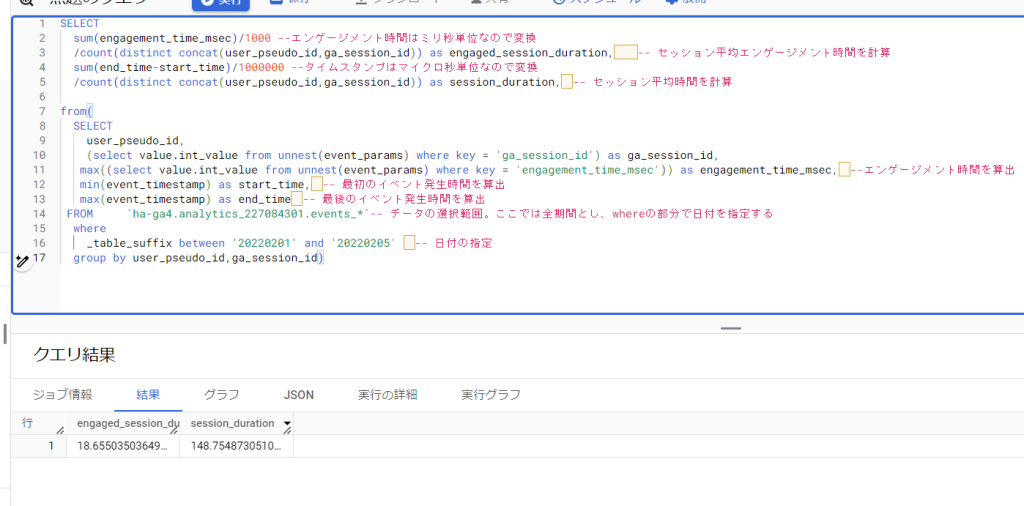
39:セッションの平均エンゲージメント時間とセッションの平均時間
セッションの平均エンゲージメント時間:画面の前面にページが表示されていた時間を元にセッションの平均滞在時間を算出
セッションの平均時間:セッションの最初と最後のイベント発生時間の差分で平均滞在時間を算出
SELECT
  sum(engagement_time_msec)/1000 --エンゲージメント時間はミリ秒単位なので変換
  /count(distinct concat(user_pseudo_id,ga_session_id)) as engaged_session_duration,  -- セッション平均エンゲージメント時間を計算
  sum(end_time-start_time)/1000000 --タイムスタンプはマイクロ秒単位なので変換
  /count(distinct concat(user_pseudo_id,ga_session_id)) as session_duration, -- セッション平均時間を計算

from(
  SELECT
    user_pseudo_id,
    (select value.int_value from unnest(event_params) where key = 'ga_session_id') as ga_session_id,
   max((select value.int_value from unnest(event_params) where key = 'engagement_time_msec')) as engagement_time_msec, --エンゲージメント時間を算出
   min(event_timestamp) as start_time, -- 最初のイベント発生時間を算出
   max(event_timestamp) as end_time -- 最後のイベント発生時間を算出
 FROM     `ha-ga4.analytics_227084301.events_*`-- データの選択範囲。ここでは全期間とし、whereの部分で日付を指定する
  where
    _table_suffix between '20220201' and '20220205'  -- 日付の指定
  group by user_pseudo_id,ga_session_id)
40:デフォルトチャネルグループごとの流入数(セッション)
流入元をデフォルトチャネルグループで分類。データはセッション単位となります。
with prep as (
select
    user_pseudo_id,
    (select value.int_value from unnest(event_params) where key = 'ga_session_id') as session_id,
    array_agg((select value.string_value from unnest(event_params) where key = 'source') ignore nulls order by event_timestamp)[safe_offset(0)] as source,-- 参照元の取得
    array_agg((select value.string_value from unnest(event_params) where key = 'medium') ignore nulls order by event_timestamp)[safe_offset(0)] as medium,-- メディアの取得
    array_agg((select value.string_value from unnest(event_params) where key = 'campaign') ignore nulls order by event_timestamp)[safe_offset(0)] as campaign-- キャンペーンの取得
from`ha-ga4.analytics_227084301.events_*` -- データの選択範囲。ここでは全期間とし、whereの部分で日付を指定する
where
    _table_suffix between '20220201' and '20220205'  -- 日付の指定
group by
    user_pseudo_id,
    session_id)

select
    case -- 条件に応じて分類。分類ルールはhttps://support.google.com/analytics/answer/9756891 に順次、最新版とは限らない
        when source = '(direct)' and (medium in ('(not set)','(none)')) then 'Direct'
        when regexp_contains(campaign, 'cross-network') then 'Cross-network'
        when (regexp_contains(source,'alibaba|amazon|google shopping|shopify|etsy|ebay|stripe|walmart')
            or regexp_contains(campaign, '^(.*(([^a-df-z]|^)shop|shopping).*)$'))
            and regexp_contains(medium, '^(.*cp.*|ppc|paid.*)$') then 'Paid Shopping'
        when regexp_contains(source,'baidu|bing|duckduckgo|ecosia|google|yahoo|yandex')
            and regexp_contains(medium,'^(.*cp.*|ppc|paid.*)$') then 'Paid Search'
        when regexp_contains(source,'badoo|facebook|fb|instagram|linkedin|pinterest|tiktok|twitter|whatsapp')
            and regexp_contains(medium,'^(.*cp.*|ppc|paid.*)$') then 'Paid Social'
        when regexp_contains(source,'dailymotion|disneyplus|netflix|youtube|vimeo|twitch|vimeo|youtube')
            and regexp_contains(medium,'^(.*cp.*|ppc|paid.*)$') then 'Paid Video'
        when medium in ('display', 'banner', 'expandable', 'interstitial', 'cpm') then 'Display'
        when regexp_contains(source,'alibaba|amazon|google shopping|shopify|etsy|ebay|stripe|walmart')
            or regexp_contains(campaign, '^(.*(([^a-df-z]|^)shop|shopping).*)$') then 'Organic Shopping'
        when regexp_contains(source,'badoo|facebook|fb|instagram|linkedin|pinterest|tiktok|twitter|whatsapp')
            or medium in ('social','social-network','social-media','sm','social network','social media') then 'Organic Social'
        when regexp_contains(source,'dailymotion|disneyplus|netflix|youtube|vimeo|twitch|vimeo|youtube')
            or regexp_contains(medium,'^(.*video.*)$') then 'Organic Video'
        when regexp_contains(source,'baidu|bing|duckduckgo|ecosia|google|yahoo|yandex')
            or medium = 'organic' then 'Organic Search'
        when regexp_contains(source,'email|e-mail|e_mail|e mail')
            or regexp_contains(medium,'email|e-mail|e_mail|e mail') then 'Email'
        when medium = 'affiliate' then 'Affiliates'
        when medium = 'referral' then 'Referral'
        when medium = 'audio' then 'Audio'
        when medium = 'sms' then 'SMS'
        when medium like '%push'
            or regexp_contains(medium,'mobile|notification') then 'Mobile Push Notifications'
        else 'Unassigned' end as channel_grouping_session,
    count(distinct concat(user_pseudo_id,session_id)) as sessions
from
    prep
group by
    channel_grouping_session
order by
    sessions desc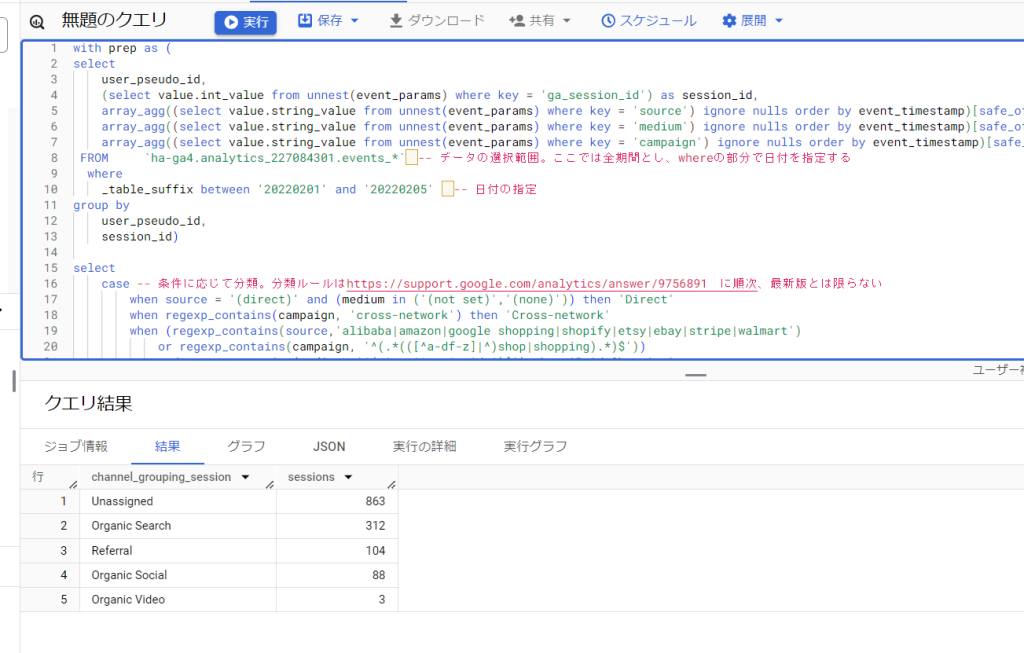
41:デフォルトチャネルグループごとの流入数(ユーザー)
流入元をデフォルトチャネルグループで分類。データはユーザー単位となります。
select
case -- 条件に応じて分類。分類ルールはhttps://support.google.com/analytics/answer/9756891 に順次、最新版とは限らない

        when traffic_source.source = '(direct)' and (traffic_source.medium in ('(not set)','(none)')) then 'Direct'
        when regexp_contains(traffic_source.name, 'cross-network') then 'Cross-network'
        when (regexp_contains(traffic_source.source,'alibaba|amazon|google shopping|shopify|etsy|ebay|stripe|walmart')
            or regexp_contains(traffic_source.name, '^(.*(([^a-df-z]|^)shop|shopping).*)$'))
            and regexp_contains(traffic_source.medium, '^(.*cp.*|ppc|paid.*)$') then 'Paid Shopping'
        when regexp_contains(traffic_source.source,'baidu|bing|duckduckgo|ecosia|google|yahoo|yandex')
            and regexp_contains(traffic_source.medium,'^(.*cp.*|ppc|paid.*)$') then 'Paid Search'
        when regexp_contains(traffic_source.source,'badoo|facebook|fb|instagram|linkedin|pinterest|tiktok|twitter|whatsapp')
            and regexp_contains(traffic_source.medium,'^(.*cp.*|ppc|paid.*)$') then 'Paid Social'
        when regexp_contains(traffic_source.source,'dailymotion|disneyplus|netflix|youtube|vimeo|twitch|vimeo|youtube')
            and regexp_contains(traffic_source.medium,'^(.*cp.*|ppc|paid.*)$') then 'Paid Video'
        when traffic_source.medium in ('display', 'banner', 'expandable', 'interstitial', 'cpm') then 'Display'
        when regexp_contains(traffic_source.source,'alibaba|amazon|google shopping|shopify|etsy|ebay|stripe|walmart')
            or regexp_contains(traffic_source.name, '^(.*(([^a-df-z]|^)shop|shopping).*)$') then 'Organic Shopping'
        when regexp_contains(traffic_source.source,'badoo|facebook|fb|instagram|linkedin|pinterest|tiktok|twitter|whatsapp')
            or traffic_source.medium in ('social','social-network','social-media','sm','social network','social media') then 'Organic Social'
        when regexp_contains(traffic_source.source,'dailymotion|disneyplus|netflix|youtube|vimeo|twitch|vimeo|youtube')
            or regexp_contains(traffic_source.medium,'^(.*video.*)$') then 'Organic Video'
        when regexp_contains(traffic_source.source,'baidu|bing|duckduckgo|ecosia|google|yahoo|yandex')
            or traffic_source.medium = 'organic' then 'Organic Search'
        when regexp_contains(traffic_source.source,'email|e-mail|e_mail|e mail')
            or regexp_contains(traffic_source.medium,'email|e-mail|e_mail|e mail') then 'Email'
        when traffic_source.medium = 'affiliate' then 'Affiliates'
        when traffic_source.medium = 'referral' then 'Referral'
        when traffic_source.medium = 'audio' then 'Audio'
        when traffic_source.medium = 'sms' then 'SMS'
        when traffic_source.medium like '%push'
            or regexp_contains(traffic_source.medium,'mobile|notification') then 'Mobile Push Notifications'
        else 'Unassigned' end as channel_grouping_user,
    count(distinct user_pseudo_id) as users
from
    `ha-ga4.analytics_227084301.events_*` -- データの選択範囲。ここでは全期間とし、whereの部分で日付を指定する
where
    _table_suffix between '20220201' and '20220205'  -- 日付の指定
group by
    channel_grouping_user
order by
    users desc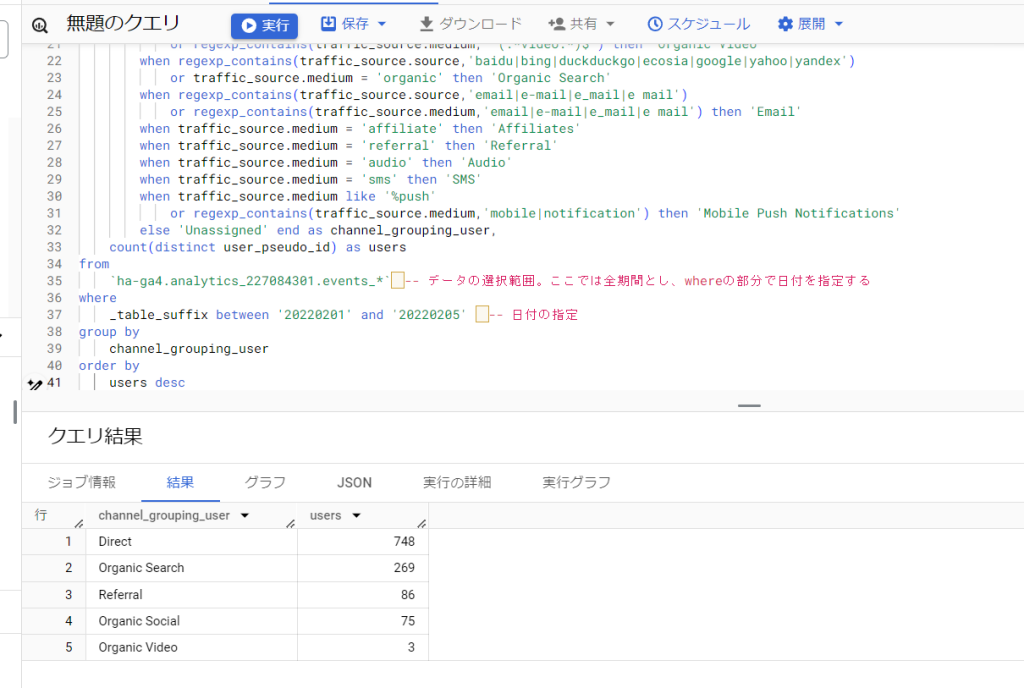
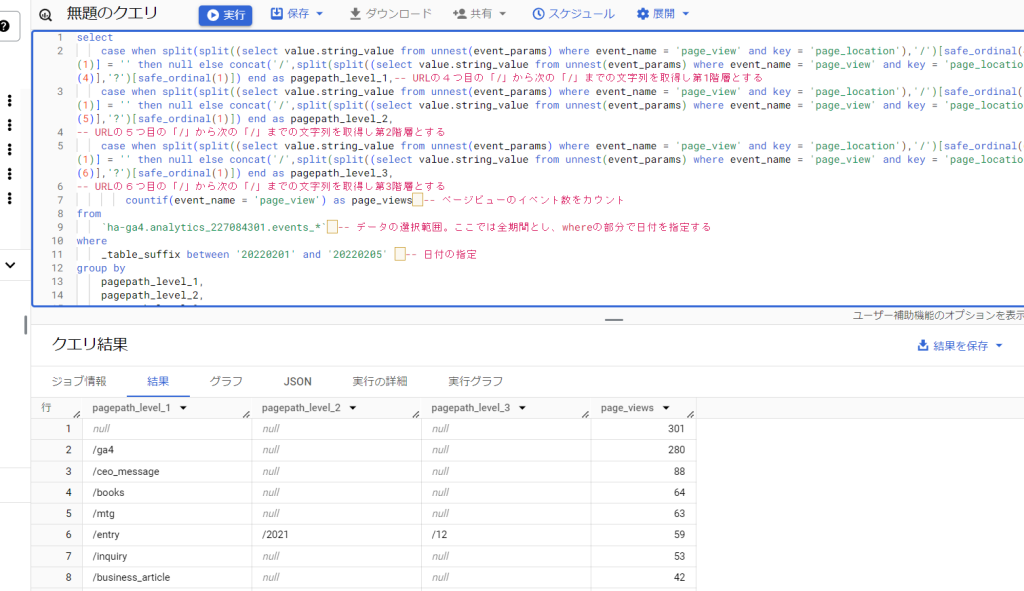
42:URL階層ごとのページビュー数
第1階層~第3階層までに対応。第4階層以降も取得したい場合は、safe_ordinalの値を1を増やす形で設定する。
select
    case when split(split((select value.string_value from unnest(event_params) where event_name = 'page_view' and key = 'page_location'),'/')[safe_ordinal(4)],'?')[safe_ordinal(1)] = '' then null else concat('/',split(split((select value.string_value from unnest(event_params) where event_name = 'page_view' and key = 'page_location'),'/')[safe_ordinal(4)],'?')[safe_ordinal(1)]) end as pagepath_level_1,
-- URLの4つ目の「/」から次の「/」までの文字列を取得し第1階層とする
    case when split(split((select value.string_value from unnest(event_params) where event_name = 'page_view' and key = 'page_location'),'/')[safe_ordinal(5)],'?')[safe_ordinal(1)] = '' then null else concat('/',split(split((select value.string_value from unnest(event_params) where event_name = 'page_view' and key = 'page_location'),'/')[safe_ordinal(5)],'?')[safe_ordinal(1)]) end as pagepath_level_2,
-- URLの5つ目の「/」から次の「/」までの文字列を取得し第2階層とする
    case when split(split((select value.string_value from unnest(event_params) where event_name = 'page_view' and key = 'page_location'),'/')[safe_ordinal(6)],'?')[safe_ordinal(1)] = '' then null else concat('/',split(split((select value.string_value from unnest(event_params) where event_name = 'page_view' and key = 'page_location'),'/')[safe_ordinal(6)],'?')[safe_ordinal(1)]) end as pagepath_level_3,
-- URLの6つ目の「/」から次の「/」までの文字列を取得し第3階層とする
        countif(event_name = 'page_view') as page_views -- ページビューのイベント数をカウント
from
    `ha-ga4.analytics_227084301.events_*` -- データの選択範囲。ここでは全期間とし、whereの部分で日付を指定する
where
    _table_suffix between '20220201' and '20220205'  -- 日付の指定
group by
    pagepath_level_1,
    pagepath_level_2,
    pagepath_level_3
order by
    page_views desc
43:events_intradayテーブルからリアルタイムに近いデータを取得
events_intradayテーブルは当日のデータがリアルタイムに近い形で格納されるテーブルです。日次テーブル(events_YYYYMMDD)は翌日以降に確定しますが、intradayテーブルを使えば当日のデータを確認できます。※intradayテーブルはBigQueryエクスポートの設定で「ストリーミング」を有効にしている場合のみ利用可能です。
select
    date(timestamp_micros(event_timestamp),"Asia/Tokyo") as event_date, -- イベントの発生日付を選択
    count(distinct user_pseudo_id) as users, -- ユニークユーザー数
    countif(event_name = 'session_start') as sessions, -- セッション数
    countif(event_name = 'page_view') as pageviews -- ページビュー数
from
    `ha-ga4.analytics_227084301.events_intraday_*` -- intradayテーブルを指定
where
    _table_suffix = format_date('%Y%m%d', current_date('Asia/Tokyo')) -- 本日のデータを指定
group by
    event_date
intradayテーブルは日次テーブルが確定すると自動的に削除されます。過去のintradayデータは残らないため、保存が必要な場合はスケジュールクエリ等で別テーブルに退避しましょう。
44:データ品質チェック(欠損日・イベント数の急変を検知)
BigQueryにエクスポートされたデータに欠損がないか、イベント数が急激に増減していないかを確認するクエリです。定期的に実行して異常の早期発見に役立てましょう。
select
    _table_suffix as date, -- テーブルの日付(YYYYMMDD形式)
    count(*) as total_rows, -- 行数(イベント数)
    count(distinct user_pseudo_id) as users, -- ユニークユーザー数
    countif(event_name = 'page_view') as pageviews -- ページビュー数
from
    `ha-ga4.analytics_227084301.events_*` -- データの選択範囲
where
    _table_suffix between format_date('%Y%m%d', date_sub(current_date(), interval 30 day))
    and format_date('%Y%m%d', date_sub(current_date(), interval 1 day)) -- 直近30日間
group by
    date
order by
    date
結果を確認し、特定の日にイベント数が極端に少ない(またはゼロ)場合はエクスポート設定やタグの不具合が考えられます。また前日比で大きな変動がある場合は、タグの変更やサイト改修の影響を確認しましょう。
45:セッションの参照元/メディアをcollected_traffic_sourceから取得
2024年以降、BigQueryエクスポートのスキーマにcollected_traffic_sourceフィールドが追加されました。従来はイベントパラメータからsourceやmediumを取得していましたが、このフィールドを使うとよりシンプルにセッション単位の流入元を取得できます。
select
    date(timestamp_micros(event_timestamp),"Asia/Tokyo") as event_date,
    collected_traffic_source.manual_source as source, -- セッションの参照元
    collected_traffic_source.manual_medium as medium, -- セッションのメディア
    collected_traffic_source.manual_campaign_name as campaign, -- キャンペーン名
    count(distinct concat(user_pseudo_id, cast((select value.int_value from unnest(event_params) where key = 'ga_session_id') as string))) as sessions -- セッション数
from
    `ha-ga4.analytics_227084301.events_*`
where
    _table_suffix between '20240101' and format_date('%Y%m%d', date_sub(current_date(), interval 1 day))
    and event_name = 'session_start' -- session_startイベントにcollected_traffic_sourceが格納される
group by
    event_date, source, medium, campaign
order by
    event_date desc, sessions desc
collected_traffic_sourceはsession_startイベントに格納されています。従来のevent_paramsからsource/mediumを取得する方法(クエリ24番)と比べて記述がシンプルになります。ただし2024年以降のデータにのみ対応しているため、それ以前のデータを分析する場合は従来の方法を使ってください。
46:クエリのパフォーマンス最適化Tips
BigQueryは処理したデータ量に応じて課金されます。以下のポイントを意識することで、コストを抑えつつ高速にクエリを実行できます。
- _table_suffixで日付範囲を必ず絞る:events_*に対して日付条件を指定しないと全期間のデータをスキャンしてしまいます。必要な期間だけに絞りましょう
- SELECT * を避ける:必要なカラムだけを指定することで処理量を削減できます。特にevent_paramsやitemsの配列は全体を読み込むとデータ量が大きくなります
- UNNESTはサブクエリで:event_paramsからパラメータを取得する場合、
(select value.string_value from unnest(event_params) where key = 'xxx')のようにサブクエリで取得する方が、CROSS JOIN UNNESTより効率的です - WITH句(CTE)の活用:複雑なクエリはWITH句で段階的に整理すると、可読性が上がりデバッグもしやすくなります(クエリ22番以降を参照)
- クエリの処理量を事前確認:クエリエディタの右上に表示される「このクエリを実行すると○○を処理します」の表示を必ず確認してから実行しましょう
前のページ: ページ遷移・CV分析クエリ(29〜36)